Setup
This guide walks you through setting up your Brightway project using Activity Browser, preparing it for use with mescal. We provide Jupyter notebooks for each step, available on the mescal GitHub repository.
Questions or issues? Please file an issue along with a detailed description or contact the mescal maintainers (for example, at matthieu.souttre@polymtl.ca)
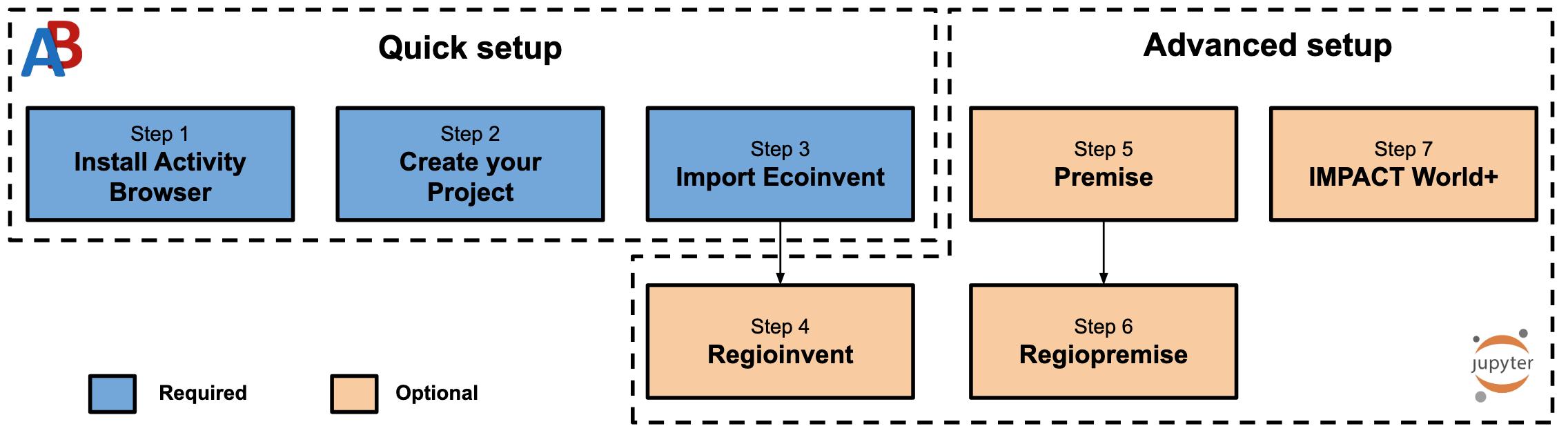
Step 1: Install Activity Browser
Activity Browser is a graphical user interface for Brightway that makes project management much easier.
Installation via conda:
conda create -n ab -c conda-forge activity-browser
conda activate ab
activity-browser
Step 2: Create Your Project
Open Activity Browser
Go to Project → New project
Give your project a meaningful name (typically, you should have one project per ecoinvent version, e.g.,
ecoinvent3.10.1)
Your project will store all databases, LCIA methods, and calculation setups in an isolated environment (i.e., there can be no exchanges among different projects).
Step 3: Import Ecoinvent Database
This is the foundation for all LCA calculations in mescal. However, note that mescal would also work with any other background database (if any) in your Brightway project.
In Activity Browser:
Navigate to Database → Import database
Select ecoinvent as the source
Choose your ecoinvent version (3.9.1 or 3.10.1 recommended for Regioinvent compatibility)
Select a system model:
Cutoff — required for Regioinvent/Regiopremise
Consequential — for consequential LCA studies (not compatible with Regioinvent)
APOS — allocation at point of substitution
Enter your ecoinvent credentials when prompted
⚠ You should only have one ecoinvent database per project. If you need to work with multiple versions, create separate projects for each.
Step 4: Regionalize Ecoinvent with Regioinvent (Optional)
Regioinvent is a tool to regionalize your ecoinvent database. Regioinvent has two main steps:
Elementary flows spatialization: it assigns geographic locations to elementary flows, thus enabling the use of regionalized LCIA methods that require spatialized flows (e.g., IMPACT World+ v2.1, EF 3.1, ReCiPe 2016).
Trade regionalization: it connects ecoinvent to BACI trade data, enabling more realistic supply chain modeling through national production processes and consumption markets.
Why use Regioinvent?
Realistic supply chains: Replaces generic RER, RoW, GLO processes with country-specific versions
Spatialized elementary flows: Connects to regionalized LCIA methods (IMPACT World+ v2.1, EF 3.1, ReCiPe 2016)
Trade-based markets: Uses UN COMTRADE/BACI data for realistic import mixes
Installation
pip install regioinvent
Required data
Download the pre-extracted trade data from Zenodo (use the latest version).
📓 Notebook: demo.ipynb
Step 5: Create Prospective Databases with Premise (Optional)
Premise allows you to create prospective LCA databases by projecting ecoinvent into future scenarios generated by Integrated Assessment Models (IAMs).
When to use Premise?
Model future energy transitions scenarios from IAMs
Include emerging technologies
Align inventories with climate scenarios (e.g., SSP, RCP pathways)
📓 Notebook: import_premise_db.ipynb
⚠️ Note: You may need an encryption key from the Premise developers to access standard IAM scenarios. Contact romain.sacchi@psi.ch
Step 6: Regionalize Premise with Regiopremise (Optional)
Regiopremise adapts Regioinvent to work with Premise databases. This allows you to combine prospective scenarios with regionalized supply chains.
What’s different from Regioinvent?
Regiopremise handles additional datasets introduced by Premise, for instance, the ones corresponding to Integrated Assessment Model (IAM) regions.
⚠️ Note: Regiopremise is also based on BACI trade data, which is not projected into the future. Therefore, the trade regionalization will be the same as in Regioinvent, even for Premise databases.
Installation
Clone or download the repository:
git clone https://github.com/matthieu-str/Regiopremise.git
Prerequisites
A Brightway2 project with a Premise-generated ecoinvent database
Trade data from Zenodo
📓 Notebook: demo.ipynb
Step 7: Install IMPACT World+ LCIA Method (Optional)
IMPACT World+ is a globally regionalized life-cycle impact assessment method developed by CIRAIG, providing both midpoint and endpoint indicators.
📓 Notebook: download_impact_world_plus.ipynb